Notebooks in Production vs Spark Job Definitions — Which One Should You Use?
While working on multiple projects across all major Spark platforms — Apache Spark, Databricks, Azure Synapse, and most recently Microsoft Fabric — I noticed one thing that stays remarkably consistent: notebooks are by far the most popular way developers write and run their PySpark code. They feel fast and interactive during development — and they are, for exploration. What most people do not realize until later is that notebooks carry hidden overhead that adds up in production. But by then, the code is already written in a notebook, so naturally… they just deploy the notebook(s). Most of the time without even knowing there are other — arguably better — alternatives. Or they know, but do not want to rewrite the code.
So let me walk through the key differences between notebooks and Spark job definitions (SJDs) to help you decide what fits your workload.
What are we comparing?
A notebook runs code in cells — sequentially, with visible outputs between each step. In production, notebooks typically run via a pipeline Notebook activity or a built-in schedule. You get orchestration, parameter passing, and the full debugging experience you are used to from interactive work.
A Spark job definition is a standalone .py file with a single entry point, command-line arguments, and its own scheduling and retry settings. No cells, no magic commands, no interactive state. What runs is exactly what is in the file.
Both exist in Fabric, Databricks, and Azure Synapse — the concept is the same everywhere, even though the naming varies. The Azure Synapse CSE team published a nice comparison of the two that largely holds true across platforms.
Getting started
Notebooks win here, hands down. Open a browser, start writing code. No IDE, no build tools, no packaging knowledge. Zero setup. The Synapse CSE team calls this out explicitly — notebooks require zero setup effort, while SJDs require familiarity with an IDE, a programming language, and build/packaging tools.
SJDs are a harder starting point for someone who just wants to explore data. But if you already write Python in VS Code or PyCharm, an SJD feels natural — it is just a .py file.
Scheduling and retry
Both notebooks and SJDs can be scheduled. Notebooks run through pipeline activities or their own built-in schedule. SJDs have native scheduling built right into the item.
The key difference is retry. SJDs have a native retry policy — you configure max retries and a retry interval directly on the job definition. For notebooks, retry must be configured at the pipeline activity level, which means you need a pipeline wrapper even for a simple “retry on failure” scenario.
One important caveat: if you enable retry on anything, the job must be idempotent. Delta Lake MERGE or overwrite patterns are your friend here.
Good news: in Fabric, there is now a native Spark Job Definition activity in Data Factory pipelines. You can drop an SJD directly onto the pipeline canvas — just like you would with a Notebook activity. The activity supports advanced settings where you can override the main definition file, command-line arguments, lakehouse references, and Spark properties — all parameterizable with pipeline expressions. So you can have a single SJD and drive different behaviors per pipeline run.
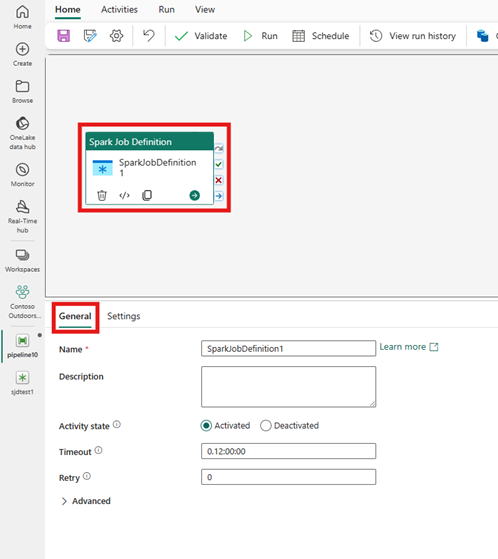
There are a few known limitations: granular run-level monitoring links are not yet surfaced directly in the Data Factory output tab (you need to check the SJD monitoring page separately), and some users may not see the Workspace Identity dropdown due to a platform issue Microsoft is working on. But the core functionality — scheduling, retry, parameterization, orchestration — is all there.
Debugging production failures
This is probably the single biggest operational trade-off.
When a notebook fails in production, the debugging experience is genuinely good. You can open the notebook, inspect cell outputs from the failed run, check the Spark UI, and rerun individual cells to isolate the problem.
When an SJD fails? You read logs. No cell-by-cell output, no inline display() results. You basically reproduce the failure in a notebook to debug it.
For teams that value fast incident resolution, this is a real consideration. Notebooks give you a much richer post-failure investigation experience.
Snapshot history and auditing
Here is where SJDs have a unique strength. In Fabric, every SJD run captures a snapshot — the effective state of the code, arguments, lakehouse references, and Spark properties at that moment. You can view any past snapshot, restore it, or save it as a new SJD. When someone asks “what exactly ran last Tuesday and with what parameters?” — you have an immediate answer.
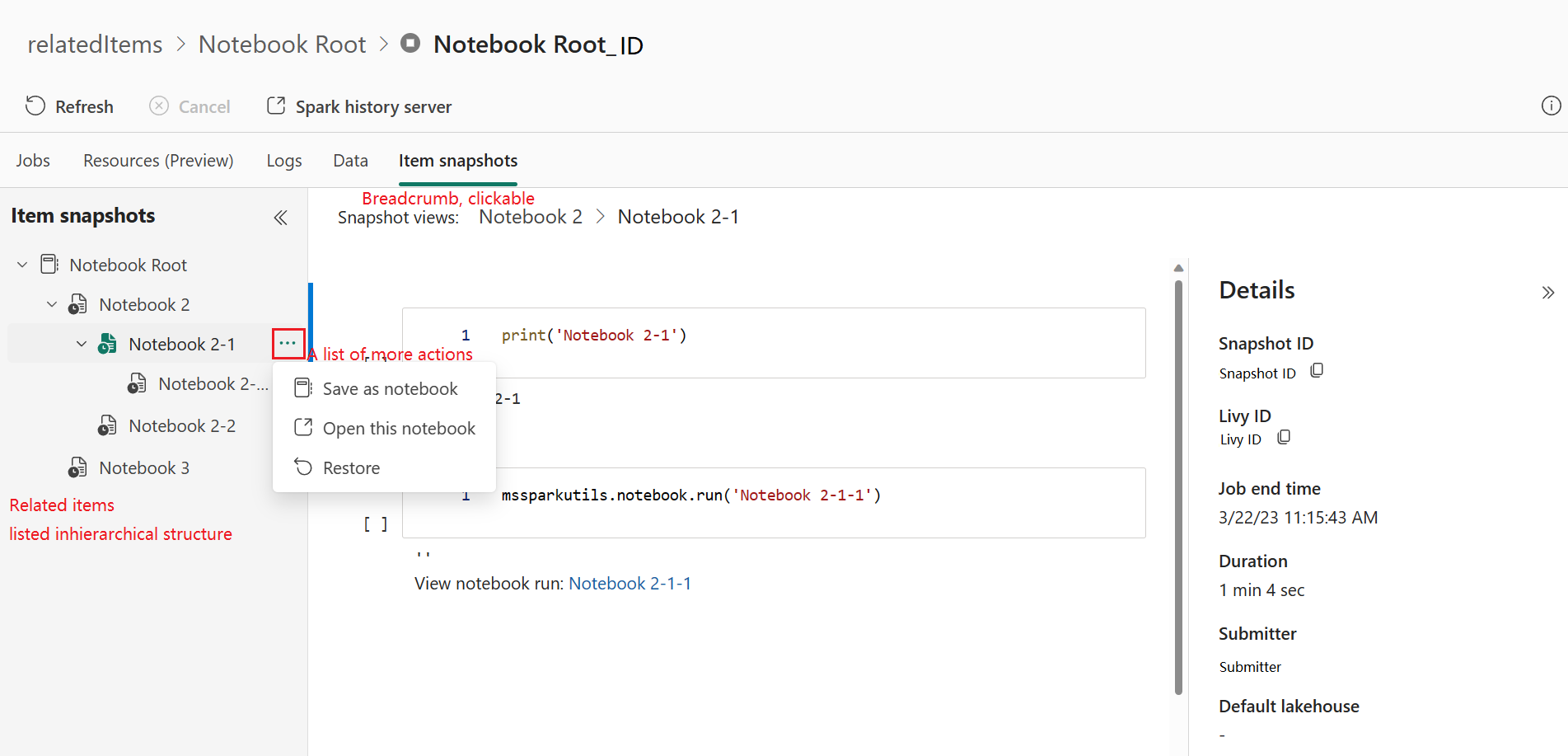
Notebooks do not have this. You rely on Git history and pipeline run logs, which tell you that something ran but not always exactly what ran if the code changed between commits.
The hidden per-cell overhead
One thing that surprised me when I started measuring: every cell boundary in a notebook adds roughly 0.5–1.5 seconds of pure overhead. The notebook engine serializes cell output, updates execution status, evaluates magic commands, and manages variable scope tracking — regardless of what code is inside the cell. This overhead is inherent to the notebook model and observable in Fabric, Synapse, and Databricks alike.
A production notebook with 50 cells wastes 25–75 seconds just on cell transitions. At 100 cells, you are looking at 1–2 minutes of pure overhead before any actual Spark code runs. SJDs execute a single .py file as one unit — zero inter-cell overhead.
The fix for notebooks is simple: fewer, larger cells. Or better yet, extract logic into imported modules so the notebook has only a handful of orchestration cells.
Related: no platform enforces a hard cell count limit, but all of them degrade above ~100–128 cells. A .py file can be as long as it needs to be.
Code sharing
Notebooks share code through platform-specific mechanisms — %run to reference another notebook, notebookutils.notebook.run() in Fabric, dbutils.notebook.run() in Databricks. These work, but they are not portable. In Fabric, notebook nesting is limited to 5 levels deep with no recursive calls.
SJDs use standard Python. You attach reference .py files alongside your main file and import them directly. Standard __init__.py, standard imports. Nothing platform-specific — which is a real advantage for teams that want portable, testable code.
Both approaches can use environment-managed wheel packages, which is the recommended common ground.
Testing and code quality
This is where SJDs really shine. A .py file is a .py file — you write pytest tests, mock SparkSession if needed, run them in CI, done. Standard software engineering workflow. On top of that, code coverage tools (pytest-cov) and profilers (cProfile, line_profiler) integrate natively with your IDE and CI pipeline — something notebooks have no direct equivalent for.
Testing notebook code is inherently harder because it lives inside cells with implicit shared state. The recommended approach — even Databricks says this — is to extract testable functions into external .py modules and test those. But at that point, the notebook is just a thin wrapper and the real logic lives in testable .py files anyway 😊. And if you stay purely in notebook-land, you end up with three notebooks — one with shared code, one for orchestration, and one for tests — where both the orchestration and test notebooks reference the shared one via %run. That is a lot of moving parts for something a single .py module and a pytest file handle natively.
Local development
Notebooks cannot run locally — they need a cloud workspace and a Spark session. You can export to .ipynb and run in local JupyterLab, but then you are managing two diverging formats and losing all platform-specific features.
SJDs? Full local development. pip install pyspark, create a local SparkSession, point it at local Parquet files, and develop in VS Code with proper debugging — breakpoints, step-through, the works. No internet connection required. When you are ready, upload the same .py file as your SJD. The only adjustment: swap the local SparkSession.builder for the platform-provided spark session and update file paths.
That said, even notebook-based projects benefit from the same pattern: extract logic into importable .py modules, develop and test those locally, and keep the notebook as a thin orchestration layer that imports your shared code.
Streaming
One more distinction worth calling out: SJDs support streaming applications. Notebooks are limited to interactive and batch execution. If you need a continuously running Structured Streaming job, that is SJD territory.
Magic commands in production runs
Notebooks in automated pipeline runs only support a subset of magic commands — in Fabric that is %%pyspark, %%spark, %%csharp, %%sql, and %%configure. Other magics silently do nothing. Inline %pip install is disabled by default in pipeline runs, which surprises teams who rely on it during development.
SJDs sidestep this entirely. No cells, no magic commands. What runs is exactly what is in the .py file.
So which one should you use?
Both. Not one or the other — both, for different purposes.
Use notebooks for interactive work — data exploration, prototyping, validating assumptions, building out logic step by step. The barrier to entry is zero: open a browser, start writing code. Notebooks are also the right choice for training new team members, debugging failed production runs, and ad-hoc analysis when someone asks “hey, can you check something in the data?”
Use Spark job definitions for production workloads — the scheduled ETL that runs every day. Clean .py entry point, native retry, snapshot auditing, proper unit testing, local development. No cell-order surprises, no magic command restrictions, no per-cell overhead. And if you need streaming — well, notebooks cannot do that anyway.
The Azure Synapse CSE team also published a decision matrix that largely aligns with what I described above — worth bookmarking.
The important insight is that the transformation logic should be the same in both paths. Whether a notebook or an SJD invokes it, the actual PySpark code can live in shared modules. The choice between the two is purely about the operational wrapper — interactive exploration and debugging vs. scheduled, repeatable production execution.
I hope some of you will find this useful.
Thanks for reading!